




Blog / Chevy Tech Features

Why Won’t Your Chevy Remote Start?

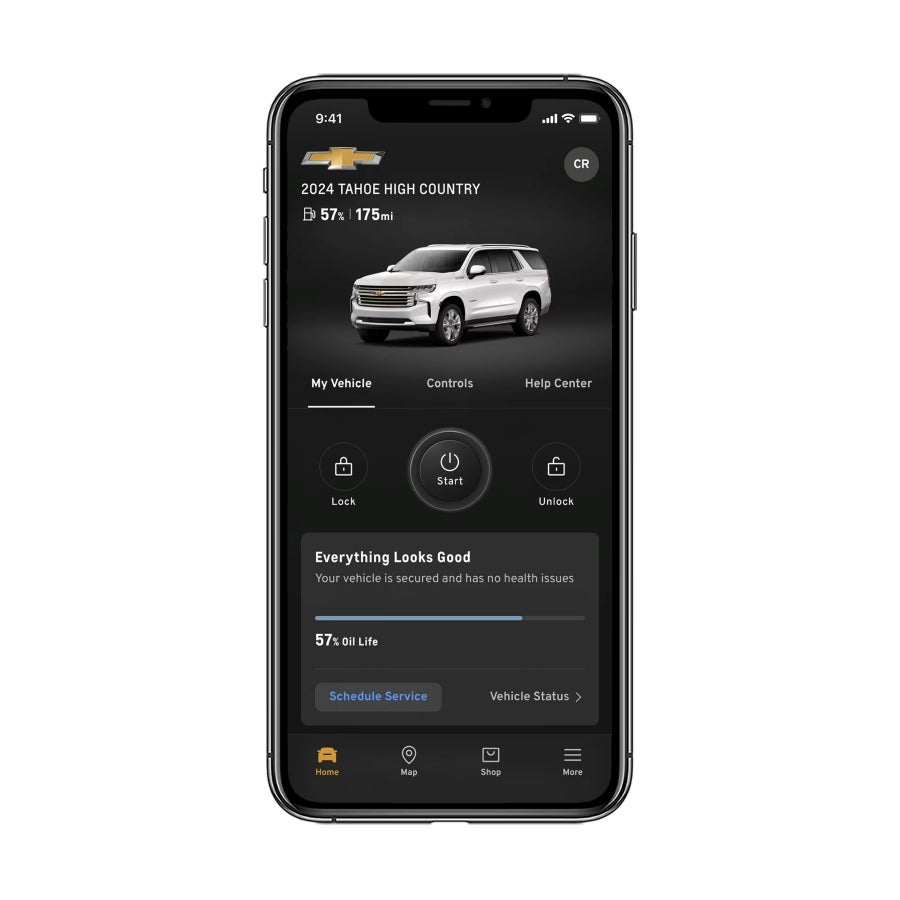
Chevy Mobile App Remote Start
If your Chevy remote start is not working, the cause may be an operating condition, a key-fob issue, or an app connection problem. A failed remote-start attempt does not automatically mean the starter needs repair.
Start by identifying how you’re sending the command and checking the owner’s manual for your Chevrolet’s model and year. Remote-start instructions, operating limits, and equipment vary, so a button sequence that works on another Chevy may not apply to yours.

Check the Vehicle’s Operating Conditions

Remote start has safeguards that can prevent operation even when the system is functioning correctly.
For example, the 2025 Chevrolet Colorado owner’s manual identifies an open hood and activated hazard flashers as conditions that prevent remote start. Other restrictions and limits depend on the vehicle.
Before trying again, check the following against your own manual:
  • Is the vehicle turned off and in Park?
  • Is the hood fully latched?
  • Are the hazard flashers off?
  • Is a key or remote left inside the vehicle?
  • Have you reached the permitted remote-start attempts or running-time limit?
  • Are there warning lights or messages?
Some vehicles require a normal start before additional remote-start use becomes available. Follow your manual’s instructions rather than repeatedly sending commands.
For a gasoline or diesel Chevrolet, only try remote start outdoors where exhaust can disperse safely.

If You’re Using the Key Fob

The key fob sends a signal directly to the vehicle. It does not rely on your phone’s internet connection or an app service plan.
Move closer to the vehicle and follow the remote-start procedure in your model-year owner’s manual. Buildings, distance, and signal interference can affect operation.
Check whether the lock and unlock buttons work consistently. If their range has also decreased, the fob battery may need attention. If you have a second programmed fob, comparing the two can help narrow the problem.
Working door-lock buttons do not prove that every remote-start condition has been met. Also, having a remote-start symbol on a replacement fob does not establish that the vehicle has the required equipment and programming.

If You’re Using the myChevrolet App

App-based starting follows a different path. It requires a properly equipped vehicle, a connected account, and an active service plan that supports Remote Commands. Depending on the vehicle and ownership terms, access may be included for a specified period or require continued paid service.
Confirm that the correct vehicle is selected, the app is updated, and Remote Commands are included in your plan. Your phone needs internet access, and the vehicle needs a supported connection with adequate coverage.
Review any error message or available command history. Save a screenshot before closing it. If the fob works but the app does not, account access or connectivity deserves a closer look before assuming a mechanical failure.

When a Warning Light Changes the Next Step

Certain faults can disable remote start. On equipped gasoline vehicles, an emissions-related malfunction accompanied by a check engine light may prevent operation.
That light does not identify the failed part. Chevrolet remote start troubleshooting may require checking diagnostic codes, vehicle battery condition, hood-latch status, or other system inputs.
If the vehicle also struggles to start normally, battery service at Sunset Chevrolet may be part of the evaluation. A weak vehicle battery and a weak fob battery are separate issues.
Persistent failure, warning messages, or unusual starting behavior warrant an inspection. Do not clear codes or disconnect the battery simply to restore remote start; that can remove useful diagnostic information.

What to Tell Sunset Chevrolet

When contacting the service team, provide:
  • Your Chevrolet’s model, year, and whether remote start previously worked.
  • Whether the failure affects the fob, app, or both.
  • Whether the vehicle starts normally from inside.
  • Any dashboard warnings or app error messages.
  • Recent battery replacement, fob replacement, or other changes.
These details help distinguish an operating restriction from a connection or vehicle issue. If the simple checks do not resolve the problem, schedule service at Sunset Chevrolet in Sumner for a diagnosis before replacing parts.

Posted in:

Related Posts

2027 Chevrolet Equinox

2027 Chevy Equinox: A Closer Look at Parking and Driver Assistance

Backing out between parked SUVs or maneuvering into a narrow space takes careful observation. The 2027 Chevrolet Equinox safety features support those tasks through camera images, warnings, and assistance that can act under certain conditions. These systems serve different purposes. A camera helps you see, an alert draws your attention to a detected hazard, and braking assistance may intervene. Understanding those differences is a useful starting point when comparing Chevrolet Equinox inventory at Sunset Chevrolet. Camera Views Help You Judge Your Surroundings The standard HD Rear Vision Camera displays the area behind the Equinox while backing up. During a demonstration, look at the image from your normal seating position and ask your consultant to explain the displayed guidelines. Available HD Surround Vision adds multiple camera views and a digital overhead image of the vehicle’s surroundings. It can help you judge positioning near parking-space lines and nearby objects during low-speed maneuvers. HD Surround Vision is included in the available Safety and Technology Package across LT, RS, and ACTIV configurations. That package also includes a Rear Camera Mirror, which offers a camera-based rearward view in place of the traditional mirror view. Try switching between the Rear Camera Mirror’s two modes. The camera image may take some adjustment, particularly if you are accustomed to focusing on a conventional mirror. Alerts Tell You Where to Look Standard Rear Park Assist provides distance alerts for detected objects behind the vehicle when reversing at low speeds. It helps draw attention to an obstacle; the warning itself does not steer the vehicle or apply the brakes. The available Safety and Technology Package adds Rear Pedestrian Alert. This feature can warn about a detected pedestrian behind the Equinox during backing maneuvers. It is an alert feature, so drivers must respond appropriately. Ask how warnings appear on the display and how they sound or feel. The Equinox also includes a standard Safety Alert Seat, which can use seat vibrations for certain warnings. Have your consultant explain the settings and which alerts use that feedback. Braking Assistance Has a Separate Role Standard Rear Cross Traffic Braking addresses detected vehicles crossing behind you while you are reversing. It can provide a warning and automatically apply emergency braking under applicable conditions. Standard Reverse Automatic Braking addresses certain detected objects directly behind the vehicle during low-speed backing. It may automatically brake when the system identifies a potential collision. These features address different situations. Neither guarantees that every obstacle or approaching vehicle will be detected, and neither makes it safe to reverse without checking your surroundings. You should not intentionally approach a person, vehicle, or obstacle to test automatic braking. Ask for an explanation of operation and limitations instead. Lane Assistance Matters Beyond the Parking Lot Standard Blind Zone Steering Assist can alert you to a detected vehicle in an adjacent lane and provide a brief steering intervention during certain lane-change situations. Enhanced Lane Keep Assist with Lane Departure Warning is also standard. It addresses unintended lane drift under applicable conditions, rather than serving as permission to change lanes. Continue using your mirrors, checking blind spots, and signaling. Lane assistance depends on factors such as detectable lane markings and operating conditions. Questions to Ask During Your Demonstration Before beginning your test drive, ask: Does this exact Equinox have the Safety and Technology Package? How do I select the available camera views? Which systems only warn, and which can brake or assist steering? How do I adjust audible alerts and Safety Alert Seat feedback? Where are the cameras and sensors, and how should I keep them clean? What speed limits and other operating restrictions apply? Rain, dirt, poor visibility, blocked sensors, and surrounding obstacles can affect performance. Cameras also have blind spots, and displayed distances may look different from actual distances. Review the owner’s manual for the specific vehicle’s limitations. To evaluate Chevy Equinox parking assistance firsthand, schedule a test drive at Sunset Chevrolet in Sumner. Ask for a parked technology demonstration before heading onto the road so you can understand the equipment on the vehicle you’re considering.

Bright blue Chevrolet Equinox EV with a white roof parked on a wet surface near a body of water.

What to Look for When Buying a Used EV

Buying a used EV is a smart way to get into an electric vehicle without paying new-car prices. But it comes with a unique set of considerations that differ from shopping for a traditional used vehicle. If you're researching your options in Sumner, WA, this guide will help you feel confident before you commit. more Battery Health Is Everything When buying a used EV, the battery is the single most important thing to evaluate. Unlike a gas engine, the battery pack is what determines the vehicle's range and long-term value. Ask for a battery health report or have the vehicle inspected by a certified technician who can pull diagnostic data. Anything above 85% is generally considered acceptable, but higher is always better. Significant degradation can mean a noticeably shorter range in everyday driving. Check the Charging History and Equipment How a battery was charged over its lifetime is important. Frequent use of DC fast charging can accelerate battery wear compared to regular Level 2 home charging. When possible, review the vehicle's charging history through available service records or connected vehicle data. Also confirm what charging equipment comes with the vehicle. Some used EVs may not include the original charge cable, which can be an added cost to factor in. Adding this to your used electric car checklist early will save you from surprises. Review Range in Real-World Conditions Advertised range figures are tested under ideal conditions. When buying a used EV, it helps to understand how range holds up in your actual driving environment. Cold weather, highway speeds, and accessory use like climate control can all reduce available range. Ask about the vehicle's estimated real-world range based on its current battery state. Test-driving the vehicle and observing how the range gauge responds is one of the best steps you can take. Look Into Ownership and Warranty History A solid used electric car checklist should always include a full vehicle history report. Look for any previous accident damage, title issues, or signs of deferred maintenance. Some used EVs may still carry portions of their original manufacturer's warranty, which can provide valuable peace of mind. Chevrolet, for example, offers EVs backed by strong warranty coverage when purchased new. Understanding what, if anything, transfers to a used buyer is worth confirming before signing anything. Verify Software and Technology Features Modern electric vehicles rely heavily on software. Confirm that the vehicle's onboard systems have received up-to-date software updates and that connected features like touchscreen navigation and remote access are functioning properly. Outdated software can affect performance and limit access to certain features. If the vehicle offers connectivity services like OnStar or built-in Wi-Fi hotspot access, verify whether those subscriptions are active or need to be renewed. Visit a Trusted Dealership for Certified Options One of the best ways to simplify buying a used EV is to shop through a dealership that offers certified used vehicles with documented inspections. That means less guesswork and more confidence in what you're getting. Buying a used EV doesn't have to feel overwhelming. By focusing on battery health, charging history, real-world range, and vehicle history, you'll be well-prepared to make a smart decision. Keep this used electric car checklist handy as you shop, and don't hesitate to lean on the expert team at Sunset Chevrolet for guidance every step of the way.

Fresh engine oil being poured into a yellow funnel

How Often Does Your Chevy Really Need an Oil Change in Sumner, WA?

If you've been driving a Chevrolet for a while, you've probably wondered whether that old "every 3,000 miles" rule still applies. The short answer is: probably not. A Chevy oil change in Sumner, Washington doesn't need to happen as often as it used to, and understanding why can save you time and money. more What Your Chevy's Oil Life Monitor Is Actually Telling You Modern Chevy vehicles come equipped with an Oil Life Monitor system that tracks driving conditions, engine temperature, and mileage to calculate when your oil actually needs to be changed. This isn't a countdown timer—it's a smart system that adapts to how you drive. When the monitor drops to around 15%, it's time to schedule your Chevy oil change. And when it hits 0%, you shouldn’t wait any longer. Trusting this system is one of the simplest things you can do to keep your engine healthy. Does Conventional vs. Synthetic Oil Make a Difference? Yes, it makes a significant difference. Most newer Chevrolet vehicles are designed to run on full synthetic motor oil, which lasts considerably longer than conventional oil under normal driving conditions. With full synthetic oil and typical driving habits, many Chevy owners can go anywhere from 7,500 to 10,000 miles between changes—sometimes more—but don’t push it. Your Chevrolet oil change service interval will depend on your specific model, the oil type used, and your driving patterns. Always check your owner's manual for the recommendation for your exact vehicle. Driving Habits That Can Shorten Your Oil Change Interval Not everyone drives under ideal conditions, and that matters when it comes to oil life. Certain habits and environments put more strain on your engine oil and may require more frequent Chevrolet oil change service. These conditions include frequent short trips under 5 miles, towing or hauling heavy loads, stop-and-go city driving, and operating in extreme temperatures. Drivers in Sumner, Washington who regularly commute in heavy traffic or use their truck for work may fall into this category, which means checking your Oil Life Monitor more frequently is a smart habit. Signs Your Chevy May Need an Oil Change Sooner Beyond the monitor, your vehicle may give you a few clues that it's time for fresh oil. Dark, gritty oil on the dipstick, a louder-than-normal engine, or a faint burning smell can all indicate that your oil is overdue. Getting an oil change for your Chevy in Sumner, Washington is a quick and straightforward service, so there's no reason to push past these warning signs. Staying on top of oil changes is one of the most effective ways to extend the life of your engine. Visit Us for Your Next Chevrolet Oil Change Service Keeping your Chevy running well doesn't require guesswork. Whether you drive a Silverado, Equinox, Trax, or any other model, staying current on oil changes is the foundation of good vehicle maintenance. If your Oil Life Monitor is flashing or it's simply been a while, now is a great time to schedule your Chevy oil change in Sumner, Washington. Our team at Sunset Chevrolet is here to help drivers throughout Sumner, WA keep their vehicles in top condition—efficiently, accurately, and with the expertise your Chevrolet deserves. Stop by or schedule your appointment online today.